Amazon EKS — EKS Architecture
Amazon EKS has two main planes: the control plane (managed by AWS) and the data plane (managed by you). Understanding how they fit together is key to operating EKS effectively.
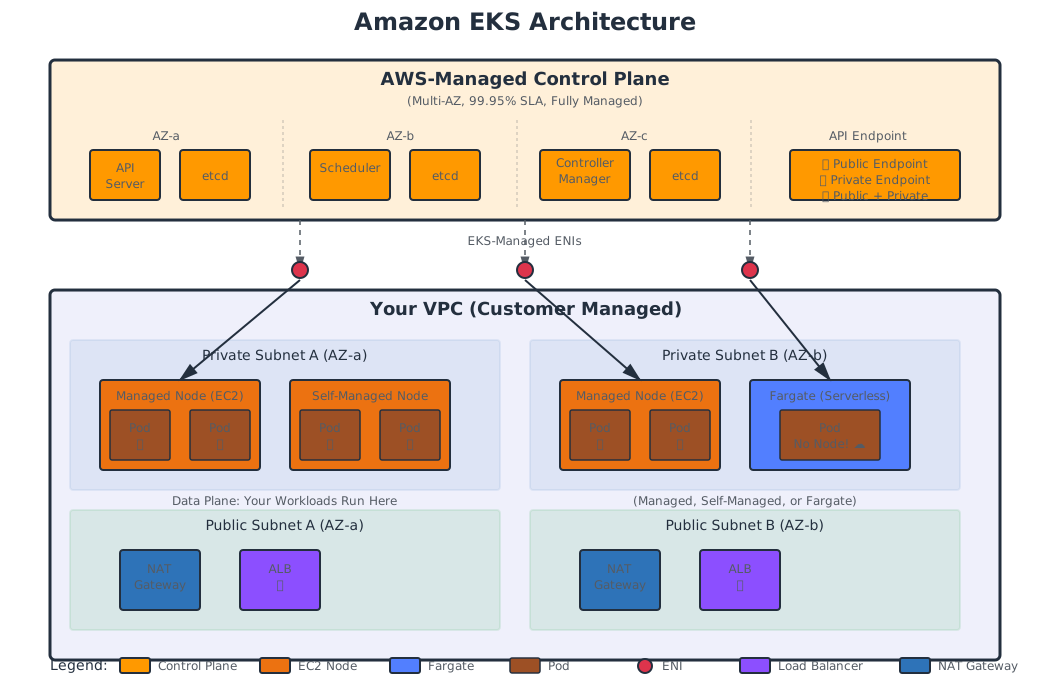
The Control Plane
AWS fully manages the EKS control plane. You don’t see it, you don’t SSH into it, and you don’t patch it.
What’s Inside
| Component | Purpose |
|---|---|
| API Server | The entry point for all Kubernetes operations (kubectl, controllers, kubelet) |
| etcd | Distributed key-value store for all cluster state |
| Scheduler | Assigns pods to nodes based on resource requirements and constraints |
| Controller Manager | Runs controllers (ReplicaSet, Deployment, Node controller, etc.) |
| Cloud Controller Manager | Integrates with AWS APIs (load balancers, volumes, routes) |
High Availability
- The API server and etcd run across at least 3 Availability Zones
- etcd uses encrypted, replicated storage managed by AWS
- If an AZ goes down, the control plane stays available
- AWS provides a 99.95% SLA for the API server endpoint
What You Don’t Manage
- No patching the API server
- No etcd backups (AWS handles it)
- No scaling the control plane (it auto-scales)
- No cert rotation (automatic)
The Data Plane
The data plane is where your workloads run. This is your responsibility (unless you use Fargate).
Three Options
| Option | Description | Who Manages Nodes? |
|---|---|---|
| Managed Node Groups | AWS-managed EC2 instances with automated updates | AWS manages lifecycle, you configure |
| Self-Managed Nodes | Your own EC2 instances joined to the cluster | You manage everything |
| Fargate | Serverless pods — no nodes at all | AWS manages everything |
Managed Node Groups (Recommended)
- AWS creates and manages an Auto Scaling Group (ASG)
- Automated AMI updates (rolling or forced)
- Graceful draining during updates (cordon → drain → terminate)
- Supports custom launch templates
- Best for most production workloads
Self-Managed Nodes
- You create EC2 instances and join them to the cluster via bootstrap script
- Full control over AMI, user data, instance lifecycle
- Use when you need: custom AMIs, specific kernel modules, Windows nodes (legacy)
- More operational work
Fargate
- Each pod runs in its own isolated micro-VM
- No nodes to manage, patch, or scale
- AWS allocates the right amount of compute per pod
- Limitations: no DaemonSets, no GPUs, no privileged containers, EFS only
API Server Endpoint Access
When you create an EKS cluster, you choose how the API server is reachable:
| Mode | External Access | VPC Access | Use Case |
|---|---|---|---|
| Public | ✅ Yes (via internet) | ✅ Yes (via ENIs in your VPC) | Development, learning |
| Private | ❌ No | ✅ Yes (via ENIs in your VPC) | Production (secure) |
| Public + Private | ✅ Yes (restricted by CIDR) | ✅ Yes | Production with remote admin |
How It Works
- Public endpoint: The API server gets a public DNS name. Requests from outside the VPC go through the internet. Requests from inside the VPC go through the EKS-managed ENIs in your subnets.
- Private endpoint: The API server is only reachable from within the VPC. A private hosted zone resolves the API server DNS to private ENI IPs.
- Public + Private: Both paths exist. You can restrict the public endpoint to specific CIDR blocks (e.g., your office IP).
Production Recommendation: Use private or public + private with CIDR restrictions. Never leave a production cluster with an unrestricted public endpoint.
VPC Integration
EKS is deeply tied to your VPC:
- Subnets: EKS places control plane ENIs in your subnets (at least 2 subnets in different AZs)
- Security Groups: EKS creates a cluster security group for control plane ↔ node communication
- Pod IPs: With the VPC CNI plugin, pods get real VPC IP addresses (not overlay IPs)
- Load Balancers: Services of type LoadBalancer create ALBs or NLBs in your VPC subnets
Subnet Requirements
| Subnet Type | Use |
|---|---|
| Public subnets | Internet-facing load balancers, NAT Gateway |
| Private subnets | Worker nodes, pods, internal load balancers |
| Intra subnets (optional) | Control plane ENIs (no route to internet) |
EKS requires specific subnet tags for auto-discovery:
# For all EKS subnets
kubernetes.io/cluster/<cluster-name> = shared

# For public subnets (internet-facing ALBs)
kubernetes.io/role/elb = 1

# For private subnets (internal ALBs, nodes)
kubernetes.io/role/internal-elb = 1
Control Plane ↔ Data Plane Communication
The EKS control plane communicates with your worker nodes via:
- Cluster Security Group — EKS creates this automatically. It allows API server ↔ node communication.
- ENIs in your VPC — EKS places cross-account ENIs in your subnets. These are the control plane’s “feet” in your VPC.
- Kubelet on each node — Communicates with the API server to receive pod specifications and report status.
Traffic flow:
kubectl / CI → API Server (public or private endpoint)
                    ↓
         EKS-managed ENIs in your VPC
                    ↓
         Worker Nodes (kubelet, kube-proxy)
                    ↓
              Pods (your workloads)
Architecture Summary
┌──────────────────────────────────────────────┐
│               AWS-Managed                     │
│  ┌──────────┐  ┌──────────┐  ┌──────────┐   │
│  │ API Srv  │  │  etcd    │  │ Scheduler│   │
│  │  (AZ-a)  │  │  (AZ-b)  │  │  (AZ-c)  │   │
│  └──────────┘  └──────────┘  └──────────┘   │
│              EKS Control Plane                │
└──────────────────┬───────────────────────────┘
                   │  ENIs in your VPC
┌──────────────────┴───────────────────────────┐
│               Your VPC                        │
│  ┌─────────────────┐  ┌──────────────────┐   │
│  │ Private Subnet A │  │ Private Subnet B │   │
│  │  ┌─────────────┐│  │ ┌─────────────┐ │   │
│  │  │  Node (EC2) ││  │ │  Node (EC2) │ │   │
│  │  │  Pod  Pod   ││  │ │  Pod  Pod   │ │   │
│  │  └─────────────┘│  │ └─────────────┘ │   │
│  └─────────────────┘  └──────────────────┘   │
│  ┌─────────────────┐  ┌──────────────────┐   │
│  │ Public Subnet A  │  │ Public Subnet B  │   │
│  │  NAT GW  ALB    │  │  NAT GW  ALB    │   │
│  └─────────────────┘  └──────────────────┘   │
└──────────────────────────────────────────────┘
Key Takeaways
| Point | Detail |
|---|---|
| Control plane is fully managed | AWS handles HA, patching, scaling, etcd backups |
| Data plane is your responsibility | Choose managed node groups, self-managed, or Fargate |
| VPC-native networking | Pods get real VPC IPs via the VPC CNI plugin |
| API endpoint matters | Use private or public+private for production |
| Multi-AZ by design | Both control plane and data plane should span AZs |
What’s Next?
Let’s look at how much EKS costs — the cluster fee, compute, networking, and the hidden costs.


